


Transforming Meeting Management with Microsoft 365

Updated: 3 days ago
The Vicious Circle of Legacy Meeting Management
The problem is usually not the meeting itself. The real operational inefficiency starts after the meeting ends. Meeting management creates a surprisingly large amount of repetitive operational work:
Preparing agendas
Collecting discussion points
Writing meeting minutes
Distributing summaries
Tracking actions
Following up on deadlines
Maintaining records
Preparing reports
Searching for previous decisions and commitments
As meeting volumes increase, this administrative layer becomes increasingly fragmented across Outlook, Teams chats, spreadsheets, SharePoint folders, and personal notes. Eventually, operational coordination itself becomes difficult to manage consistently.
This becomes especially visible in procurement, supplier management, PMO, and operational coordination environments. Here, meetings directly drive sourcing activities, supplier follow-up, project execution, approvals, operational reporting, and cross-functional coordination.
The result is usually predictable:
Actions become difficult to track
Ownership becomes unclear
Follow-up becomes inconsistent
Reporting becomes manual
Operational visibility deteriorates
Meeting history becomes fragmented
Ironically, most organizations attempt to solve this problem by adding more meetings to ease the pain of unresolved actions.
The Way Out
Instead, I decided to automate the administrative layer around meetings using Microsoft 365 Power Apps, SharePoint, Teams, Azure Speech for audio transcription (speech-to-text), and AI-assisted transcript processing.
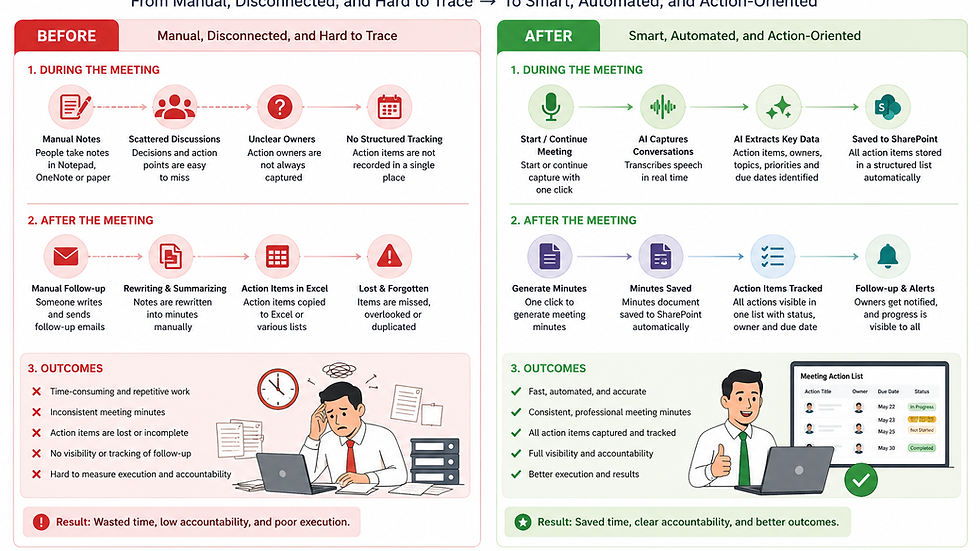
The objective was not to create another “AI meeting assistant" but to simplify operations using tools most organizations already own within Microsoft 365.
The solution automates several repetitive operational activities around meetings:
Transcript intake
AI-assisted meeting summaries
Action item extraction
Owner identification
Operational highlights
Meeting minutes preparation
Centralized storage (audit trail)
Follow-up tracking
The workflow uses Power Apps recordings and resulting transcript files as operational inputs. Power Automate processes the transcript, applies AI where useful, generates structured outputs, and stores the information centrally in SharePoint.
Importantly, AI is not replacing operational control or human review. We still retain a human-in-the-loop when a secretary checks AI-generated actions. AI reduces repetitive administrative processing where manual effort adds little operational value.
This distinction matters because most organizations do not need fully autonomous AI meeting systems. They need practical operational support that improves coordination, visibility, documentation, and follow-up management without creating additional governance complexity.
The Cost and Benefit Analysis of Meeting Management
You can find more details in the YouTube video below. The interesting observation is that for such topical nano-solutions, the cost is accessible, if not marginal:
Power Apps and Power Automate Premium - $35/month
Azure speech-to-text - $1/audio hour and free for the first year
CloudConnect WEBM-to-WAV audio conversion - $10/500 conversions, plus 10 free daily conversions for free.

The cost depends on the workflow’s components, existing license entitlements, and monthly processing volume. Separate the estimate into:
Application and workflow licensing: the Power Apps and Power Automate licenses required for the intended users and deployment.
Audio transcription: charges for converting recordings into text, where the process does not already receive a usable transcript.
AI processing: credits consumed when extracting actions and generating meeting outputs.
Supporting services: any audio conversion, storage, or third-party connectors used by the solution.
AI processing should be budgeted separately from application licenses.
From 1 November 2026, new or renewed eligible Power Platform licenses will no longer include seeded AI Builder credits. Qualifying existing entitlements continue through their applicable contract term. Continued processing requires sufficient AI Builder or Copilot Credits.
Estimate the cost using representative meetings. Measure recording duration, transcript length, AI consumption, and any repeated processing. Compare that cost with the administrative time saved and the improvement in action tracking.
An organization’s existing Microsoft 365 environment provides a useful starting point. It does not establish that every component or processing run is already covered.
Embracing Automation for Better Outcomes
The future of meeting management is here. Embracing automation can transform how we manage meetings. It’s about making our processes smarter, not harder. By leveraging Microsoft 365, we can streamline operations and enhance productivity.
Imagine a world where meeting notes are automatically generated, action items are tracked seamlessly, and follow-ups are a breeze. This is not just a dream; it’s achievable with the right tools.
Conclusion
In conclusion, integrating Microsoft 365 tools can revolutionize meeting management. It’s time to break free from the chains of manual processes. Let’s embrace automation and make our workflows efficient and effective.
The full solution overview is available here: https://www.goodspending.com/ai-enabled-meeting-administration


Comments